
Supporting WinnerMeta
We rely on ads to keep the servers running.
Please disable AdBlock or Become a Supporter for an ad-free experience.
Stream Appearances Just Got a Major Upgrade — Including Teammate POV
Stream Appearances Just Got a Major Upgrade — Including Teammate POV
We've completely rebuilt Stream Appearances, and it's one of the biggest updates WinnerMeta has shipped. If you've ever wanted to see every moment you appeared on a Twitch stream — not just the match, but the exact fight, with full context — this update is for you.
What's New
Engagement-Level Detail
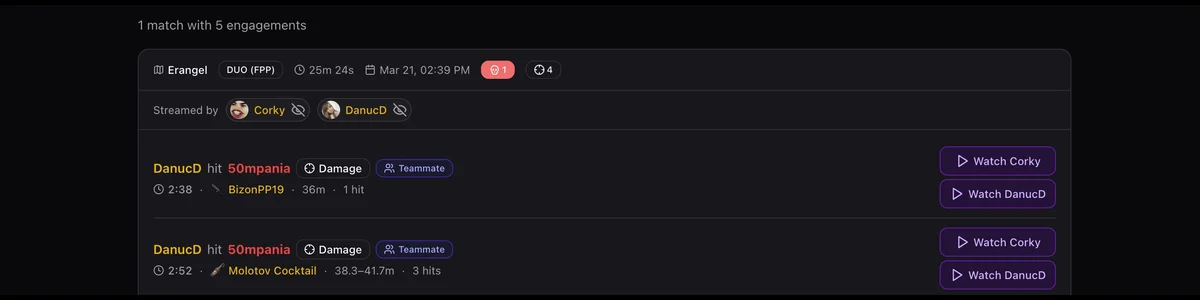
Before this update, Stream Appearances showed you which matches had a broadcaster in them. That was useful, but it left a lot of questions unanswered: what happened? Who fought who? When exactly? Now every stream appearance is broken down into individual engagements. Each card shows:
- Who attacked who — the searched player vs. the broadcaster (or their teammate)
- Weapon used — with icon and a direct link to that weapon's stats page
- Distance — how far apart the players were
- Hits landed — and whether it ended in a kill, knock, or just damage You get real context before you even click Watch.
Inline Twitch Player
Clicking Watch now opens the VOD directly on the page, cued to the exact moment of the engagement. No more copying timestamps, jumping to Twitch, and scrubbing through footage manually.
Multi-Perspective Viewing
When multiple broadcasters streamed the same match, you can switch between their VODs for the same engagement. One fight, different camera angles — pick the perspective you want to watch.
Broadcaster Filtering
If the searched player is themselves a broadcaster, their own stream is automatically hidden, so you see only how they appeared on other people's streams. You can also manually show or hide any broadcaster from the results.
The Big One: Teammate POV
This is the update that changes how many stream appearances actually show up. Previously, we only detected fights where the searched player directly engaged the broadcaster. That's fine for solo situations, but PUBG is a squad game. A broadcaster's teammate might be the one fighting you — while the broadcaster is right there in the same squad, on stream, watching it happen. We now detect these automatically. When processing match telemetry, we identify the broadcaster's full squad and include engagements where any teammate fought the searched player. These appearances are tagged with a Teammate badge so it's always clear: this is the teammate's fight, seen from the broadcaster's camera angle.
Why This Matters
- Significantly more appearances per player. Many fights that were previously invisible now show up on your profile.
- The VOD timestamps are still accurate. Same match, same team, same moment — the broadcaster was right there.
- No manual work needed. Data fills in automatically going forward as new matches are processed. We don't want you to miss any moment you appeared on stream, even when it was a teammate of the broadcaster who fought you. That's the gap Teammate POV closes.
One More Thing: Your Favorites Are Right There
We also added a quick-access section directly below the search box on the Stream Appearances page. If you're logged in, your own player and any players you've favorited appear there instantly — no need to type anything. One click and you're in.
Try It Now
Search for your player on WinnerMeta, open the Streams tab, and see every fight you had on stream — including the ones you never knew about. → Go to Stream Appearances